Copper · Buyer guide
“Allow 20% spare” sounds clear until the quotes arrive. One bidder adds installed outlets, another leaves empty panel positions, and a third increases the switch count. All three may call it spare capacity. Decide which layer needs headroom and where that headroom will be useful.

Give each kind of spare a name
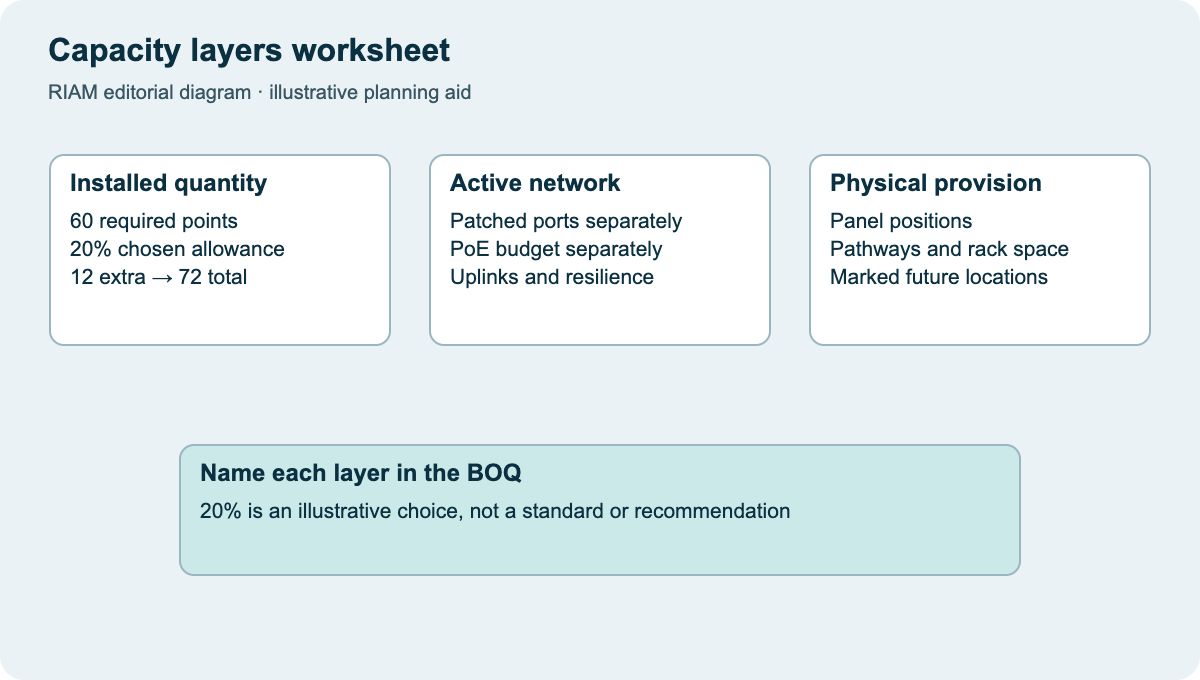
Separate installed and tested outlets from empty patch-panel positions, spare switch ports, PoE budget, pathway capacity and rack space. A spare outlet without an active port may still be useful later, but it is not an immediately usable powered network connection.
Write the intended state in the BOQ. “Ten installed, terminated and tested spare outlets at marked locations” means something different from “ten reserved panel positions”. This prevents a commercial comparison from treating very different deliverables as the same allowance.
Use planned changes to place the allowance
Ask which areas may grow, change furniture or add equipment. A future meeting room, a new AP location and a desk expansion can need different routes and connection types. Map those changes instead of spreading a percentage evenly across the floor.
CommScope’s Cat 6A portfolio includes distinct products and system choices. CommScope Category 6A portfolio The expansion discussion should still identify the selected parts and performance requirement. Spare cable of an unspecified type is not a reliable substitute for a documented system and an accessible installation route.

Calculate the installed allowance transparently
For an illustrative plan with 60 required installed points and a chosen 20% installed-point allowance, the extra quantity is 12 and the total is 72: 60 × 0.20 = 12; 60 + 12 = 72. The percentage is an example input, not a recommendation for every office.
State the rounding rule when the calculation produces a fraction and identify where the extra points go. If the business instead wants only pathways for future points, price that different scope explicitly. An arithmetic allowance cannot decide the location or construction work on its own.
Review active capacity independently
Determine how many outlets need patching at move-in and which need power. Include the intended switch functions, uplinks and resilience requirements in the active design. Do not infer switch quantity merely by dividing the installed outlet count by a nominal port count.
Check the impact on panels, managers, cabinet space, power and pathways with the designer. If one layer becomes the constraint, record the change needed there. More spare switch ports cannot create a new cable route to an inaccessible area of the building.
Locate the allowance on the drawing
For the illustrative 12 extra points, mark each proposed location or list the area awaiting a decision. If only eight locations are agreed, keep the remaining four unresolved. A total of 72 in the BOQ is not a substitute for deciding which connections the contractor must actually install.
Put future work into the handover
Label installed spares and include them in the agreed testing and as-built records. Mark reserved panel positions and future pathways as reserved, not installed. Record any access dependencies for the next phase so the allowance remains understandable after the original project team leaves.
Use the worksheet to agree a precise scope before requesting RIAM’s structured-cabling quote. It complements the port-count article: that article establishes current locations, while this one records what capacity is being bought for later. A clear reserve is useful because another person can identify and use it, not because a percentage appears in the tender.
Capacity layers worksheet
Use this as a discussion worksheet. Highlighted cells can be edited for your planning, then printed. Changes are not saved automatically.
| Layer | Day-one requirement | Reserved / future requirement | Evidence |
|---|---|---|---|
| Installed points | 60 in illustrative example | 12 extra; 72 total | Marked locations + tests |
| Panel capacity | Map all installed terminations | Identify empty reserved positions | Panel schedule |
| Active ports / PoE | Based on patched devices | Separate port and power allowance | Approved active design |
| Pathways / rack | Actual routes and occupied space | Future route / space requirement | Survey and layout record |
Example values, where shown, are labelled assumptions. This is not a quotation or an engineer-approved design.
Questions buyers ask
Is 20% a standard spare allowance?
Not in this example. It is a labelled planning choice. Use your growth plans, layout and later access costs to agree the allowance.
Do spare outlets need testing?
State that they are part of the installed and accepted scope if that is required. Keep untested or unterminated capacity explicitly separate.
Does an empty switch port mean the room is expansion-ready?
Only at one layer. Check the outlet, cable route, patching, power and other design requirements too.
Should future outlets be installed immediately?
Compare the business plan and the difficulty of later access. Record whether you are buying installed connections or only provision for them.
How do we avoid losing track of reserved capacity?
Include it in the labels, panel schedule, active design and as-built records, with an owner for later changes.
Discuss the requirements with RIAM’s copper services team. For background, read the existing copper guide.
Manufacturer references
References checked on 22 October 2026. Model details and project suitability should be checked against the selected configuration.