Copper · Buyer guide
Your new office has 40 seats. Does that mean 40 network points? Not necessarily. Meeting-room systems, printers, access points and shared equipment can sit outside the seating plan, while some desks may use wireless connectivity. Count actual connection needs before asking contractors to price a number.

Count places and devices separately
Start with the floor plan and give each area an ID. For every desk or shared zone, list what must connect, how it connects and whether the connection is needed at move-in. Do not assume every room follows the same desk policy. Reception, finance, engineering and meeting spaces may have different device requirements.
Make one row per connection location rather than one row per employee. A person’s laptop and phone do not automatically need two separate permanent outlets; the chosen endpoint arrangement matters. Conversely, one desk may need several dedicated connections. Ask IT to approve the arrangement rather than letting a furniture count decide it.
Add the devices people forget
Walk the ceiling plan as well as the furniture plan. Access points, cameras, access-control interfaces, printers and collaboration systems may need positions that are easy to miss on a seating drawing. Confirm scope ownership where security, building management and IT use separate contractors.
Do not set the access-point count from a generic floor-area rule. Cisco’s survey guidance treats the environment and intended usage as design inputs. Cisco WLAN site survey guidelines In the point schedule, mark AP quantities provisional until the wireless design fixes their locations and connections.

Keep outlets, patching and switch ports distinct
An installed outlet is part of the passive cabling. A patch cord connects it into the active network when required, and a switch port supplies the particular network connection. These are related quantities, but they need not be equal at every stage.
The CommScope Cat 6A range is one example of a product family used when specifying permanent cabling. CommScope Category 6A portfolio Select the actual system and application requirements with the designer. The cable choice alone does not establish how many switches, PoE ports or uplinks the office will need.
Work through an illustrative move-in count
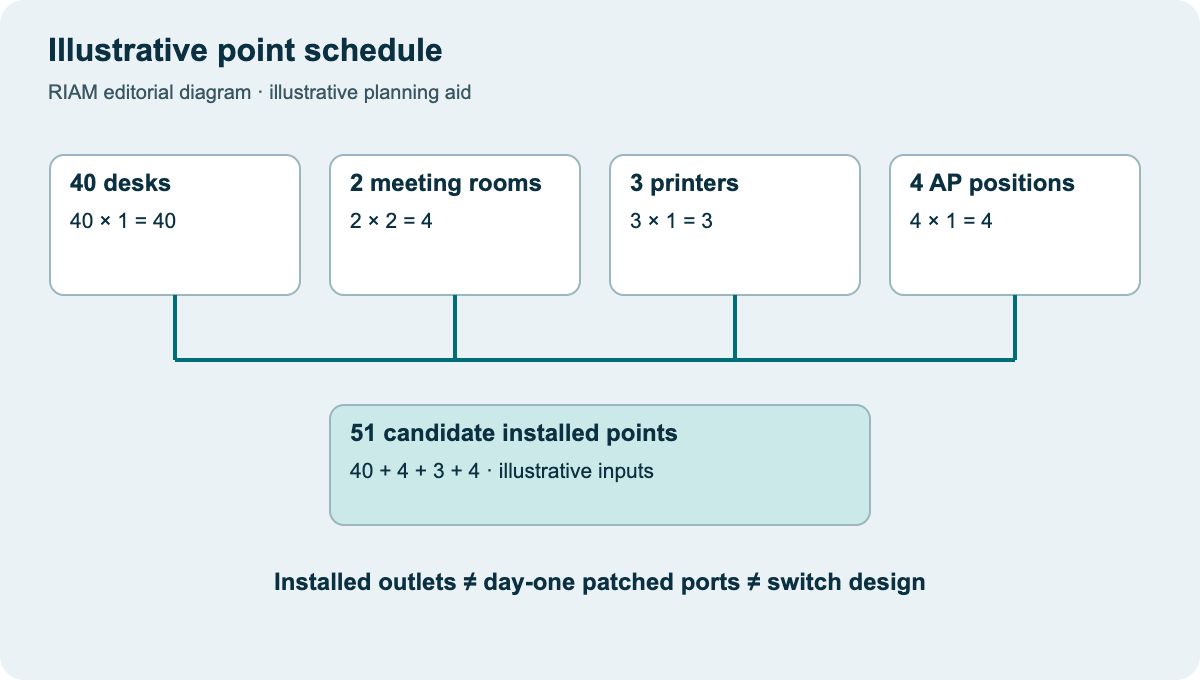
Suppose a planning exercise has 40 desks with one wired connection each, two meeting rooms with two connections each, three printers and four provisional AP positions. That makes 51 candidate installed points: 40 + 4 + 3 + 4. These are illustrative inputs, not a recommendation for a 40-person office.
If only 35 desk outlets will be patched at move-in, the initial active-port requirement changes. AP power, switch uplinks and resilience can change the equipment plan again. Keep those decisions in separate columns so a passive installation quote is not mistaken for a complete active network design.
Issue a schedule the contractor can survey
Record the outlet location, route origin, quantity, service, timing and owner. Mark uncertain locations rather than hiding them in a blanket spare percentage. Give the contractor the floor-plan revision and identify access restrictions before asking for a firm price.
At the design review, reconcile the schedule against panel capacity, pathways, rack space and power. Then freeze a move-in baseline with a clear change process. Send RIAM the approved floor plan and point schedule through the structured cabling service enquiry so the quote can respond to actual locations rather than a seat count alone.
Illustrative point schedule
Use this as a discussion worksheet. Highlighted cells can be edited for your planning, then printed. Changes are not saved automatically.
| Zone / use | Planning calculation | Installed points | Patched at move-in |
|---|---|---|---|
| Desks | 40 locations × 1 connection | 40 | 35 (example) |
| Meeting systems | 2 rooms × 2 connections | 4 | Confirm design |
| Printers | 3 locations × 1 connection | 3 | Confirm design |
| AP positions | 4 provisional locations × 1 | 4 | Confirm survey and model |
| Total candidates | 40 + 4 + 3 + 4 | 51 | Do not infer switch sizing |
Example values, where shown, are labelled assumptions. This is not a quotation or an engineer-approved design.
Questions buyers ask
Is one outlet per employee a safe rule?
It is a starting assumption only. Count the chosen device arrangements and shared equipment, then have IT approve the schedule.
Do APs count as data points?
Count their required wired connections in the schedule. Final numbers and locations depend on the selected AP and wireless design.
Are installed and active ports the same?
No. Some installed outlets may be left unpatched. Keep installed, patched and equipment-port quantities separate.
Should every department get the same spare allowance?
Base the allowance on planned changes and the cost of later access. A uniform percentage can hide very different needs.
What should I send for a quote?
A dated floor plan, location-based point schedule, application requirements, project city and work-window constraints are useful starting inputs.
Discuss the requirements with RIAM’s copper services team. For background, read the existing copper guide.
Manufacturer references
References checked on 22 October 2026. Model details and project suitability should be checked against the selected configuration.